

|
5 People Are Viewing This Product Right Now |
Beats Solo 4 Wireless On-Ear Bluetooth Headphones, Up to 50-Hour Battery Life, Ultra-Lightweight Comfort, Powerful and Balanced Sound, Apple & Android Compatible
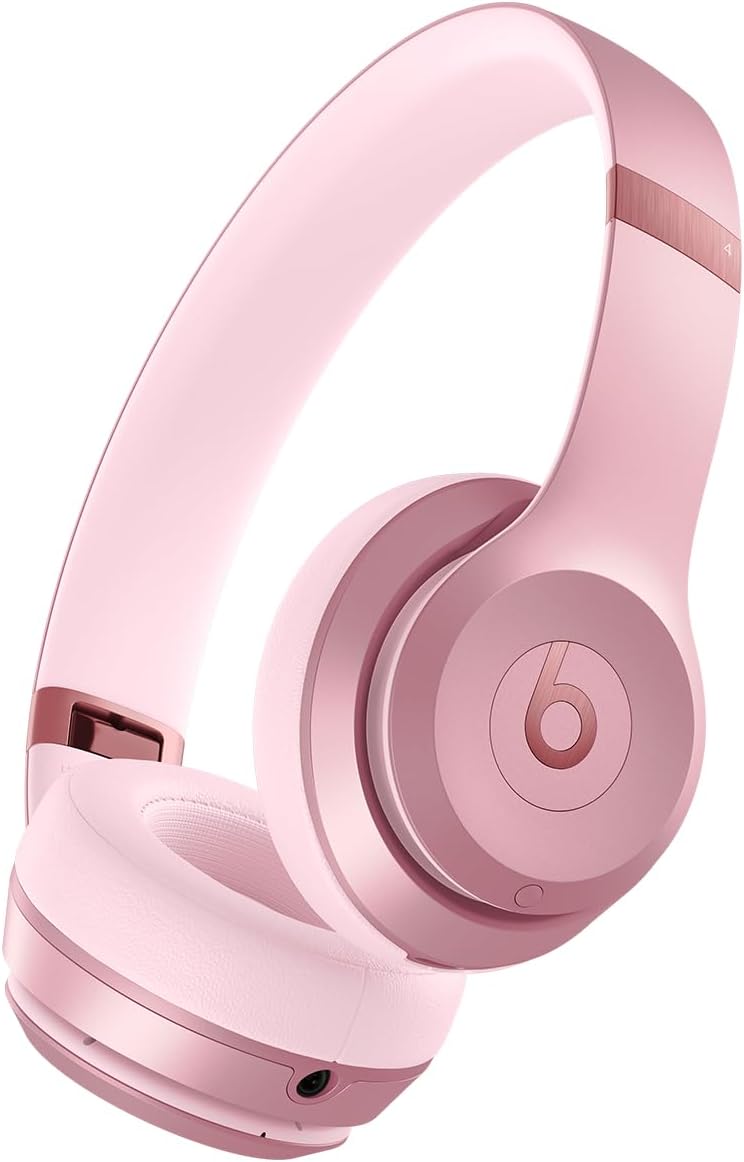
The Beats Solo 4 wireless on-ear Bluetooth headphones redefine audio experiences with their exceptional design and functionality. These headphones promise a remarkable listening experience, blending style with comfort.
Beats Solo 4 Wireless Features
- Personalized Spatial Audio with dynamic head tracking.
- Ultralight ergonomic design for all-day comfort. Flex-grip headband and ergonomically angled, adjustable ear cups for a stable fit.
- UltraPlush ear cushions are designed for comfort and durability.
- Up to 50 hours of battery life.
- Fast Fuel means a quick 10-minute charge gives up to 5 hours of playback.
- Lossless audio via USB-C or 3.5 mm audio cable.
- Dual compatibility, including one-touch pairing for both iOS and Android.
- High-quality call performance and voice assistant interaction via built-in microphone.
- Industry-leading Class 1 Bluetooth for extended range and fewer dropouts


1. Battery Life and Comfort
One of the standout features of the Beats Solo 4 is their impressive battery life, lasting up to 50 hours on a single charge. This longevity ensures that you can enjoy long listening sessions without worrying about recharging frequently. Additionally, the ultra-lightweight design offers remarkable comfort, making them perfect for extended wear, whether you are on your commute or working out.
2. Sound Quality and Compatibility
The powerful and balanced sound delivered by the Beats Solo 4 sets it apart from many competitors. With clear highs and deep lows, these headphones cater to various musical tastes. They are seamlessly compatible with Apple devices, allowing users to easily connect and enjoy their favorite tracks hassle-free. Overall, the Beats Solo 4 headphones provide an ideal combination of durability, comfort, and superb audio quality.
Beats Solo 4 Wireless Specifications
| Noise Control | Sound Isolation |
| Sensitivity | 100 dB |
| Headphones Jack | 3.5 mm Jack |
| Model Name | Beats Solo 4 |
| Connectivity Technology | Wireless |
| Wireless Communication Technology | Bluetooth |
| Included Components | 3.5 mm analog audio cable, Beats Solo 4 headphones, Protective Case, Quick Start Guide, and Warranty Card, USB-C to USB-C cable for charging and audio (USB-C power adapter sold separately) |
| Age Range (Description) | Adult, Teen |
| Material | Plastic |
| Specific Uses for the Product | Entertainment, Fitness, Travel |
| Charging Time | 2 Hours |
| Recommended Uses for the Product | Calling, Exercising, Gaming, Office Meetings |
| Compatible Devices | Cellphones, Desktops, Gaming Consoles, Laptops, Tablets |
| Control Type | Volume Control, App Control, Button Control, Siri, Touch Control, Voice Control |
| Cable Feature | Without Cable |
| Item Weight | 1.1 Pounds |
| Water Resistance Level | Not Water Resistant |
| Unit Count | 1.0 Count |
| Style | Solo4 |
| Control Method | App, Touch, Voice |
| Number of Items | 1 |
| Controller Type | Button, Siri, Touch |
| Battery Life | 50 Hours |
| Audio Driver Type | Dynamic Driver |
| Bluetooth Range | 100 Meters |
| Bluetooth Version | 5.3 |
| Carrying Case Material | Fabric |
| Carrying Case Color | Black |
| Earpiece Shape | Circle |
| UPC | 195950377002 |
| Manufacturer | Beats |
| Product Dimensions | 8.19 x 5.04 x 3.69 inches |
| Item Weight | 1.12 pounds |
| ASIN | B0FHLPS8ZF |
| Item model number | MDWJ4LL/A |
| Batteries | 1 Lithium-ion battery required. (included) |
| Date First Available | September 1, 2025 |
Frequently Asked Questions
- How do I pair with my iPhone?
Pairing mode is automatically enabled the first time you power on the Beats Solo 4. To pair an iPhone running the latest iOS, simply hold the headphones near an unlocked phone and follow the on-screen instructions. Or, go to the Bluetooth menu and select “Beats Solo 4”. - How do I pair with my Android device?
Pairing mode is automatically enabled the first time you power on the Beats Solo 4. To pair using Google Fast Pair, a one-touch pairing on-screen prompt will appear on your Android device. For older Android devices or to pair manually, use the Beats app or pair in the Bluetooth menu by selecting “Beats Solo 4”. To download the Beats app, visit the Google Play Store or download directly from beatsbydre.com. - How do I pair with additional Bluetooth devices?
To initiate pairing mode again, hold down the Power button on the right ear cup until the LED light on the left ear cup begins to blink white. Beats Solo 4 is now in pairing mode and can be paired to any standard Bluetooth device. - How do I activate Siri or other voice assistants?
On Apple devices, you can activate Siri hands-free by saying, “Hey Siri. Or, press and hold the ‘b’ button to activate your voice assistant on your iOS or Android device. - Do my headphones have a microphone?
Beats Solo 4 has two digital beam-forming microphones powered by an advanced voice-learning algorithm for voice targeting and noise suppression. The algorithm was tested in over 7,000 hours of noisy environments to better isolate your voice. - Can I control calls from my headphones?
Yes, the Beats Solo 4 features controls built into the left ear cup.Use the ‘b’ button to answer or decline incoming calls—one press to answer, two presses to decline. While on a call, one press will mute and unmute, and two presses will end the call. - Can I control my music from my headphones?
Yes, the Beats Solo 4 features controls built into the left ear cup. Use the ‘b’ button to control playback—one press to play or pause, two presses to skip to the next track, or three presses to go back. Press above and below the ‘b’ button to turn the volume up and down. - Are my headphones noise-cancelling?
No, Beats Solo 4 does not feature Active Noise Cancelling (ANC). Beats Studio Pro offers both ANC and Transparency mode in an over-ear design. - Do my headphones have Spatial Audio?
Beats Solo 4 has personalized Spatial Audio with dynamic head tracking and uses built-in gyroscopes and accelerometers to surround you with sound as you move, creating a truly immersive listening experience on Apple platforms. You can customize your Spatial Audio in your iOS settings by going to Settings > Personalized Spatial Audio and following the on-screen instructions. Please note that an iPhone with a TrueDepth camera is required to create a personal profile for Spatial Audio, which will sync across Apple devices running the latest operating system software, including iOS, iPadOS, macOS, and tvOS. - Can I plug my headphones into a non-Bluetooth device with an aux cord?
You can listen to high-resolution lossless audio via a USB-C or a 3.5 mm audio cable. Listening via a 3.5 mm audio cable requires zero battery power. - How do I charge my headphones?
To charge your Beats Solo 4, connect the headphones to a power source using the included USB-C cable. (Note: The USB-C power adapter is sold separately.) The LED light will illuminate while the headphones are charging. - How long does the battery last?
Beats Solo 4 has up to 50 hours of battery life — plus endless lossless audio when listening via the 3.5 mm audio cable. If you’re low on power, Fast Fuel means a 10-minute charge gives up to 5 hours of playback.


| Headphone Collections | |
|---|---|
 |
 |
| View Amazon Discount | View Walmart Discount |
You Might Also Like




